Project summary
| Client | Public university (anonymised) |
|---|---|
| Problem | A public university replaced the paper and PDF company lists of its in-house career seminar (100+ exhibitors) with Seminar Navi, a service students open in one tap from LINE. Students filter the companies they want to meet before the event, and the university reviews views and visits as data. It went live about five weeks after requirements were defined. |
| Solution | How we worked: in the first meeting we clarified the seminar format, the target faculties, and the metrics the university wanted to measure. Meetings and follow-up questions were handled directly in Japanese, and what was decided and what was still open was shared in writing each time. We started with a few faculties and will decide with the university whether to expand once the results are confirmed. |
| Engagement model | Service provided and operated by VAON (the university needs no servers or maintenance) |
| Timeline | 1 months |
Project Context
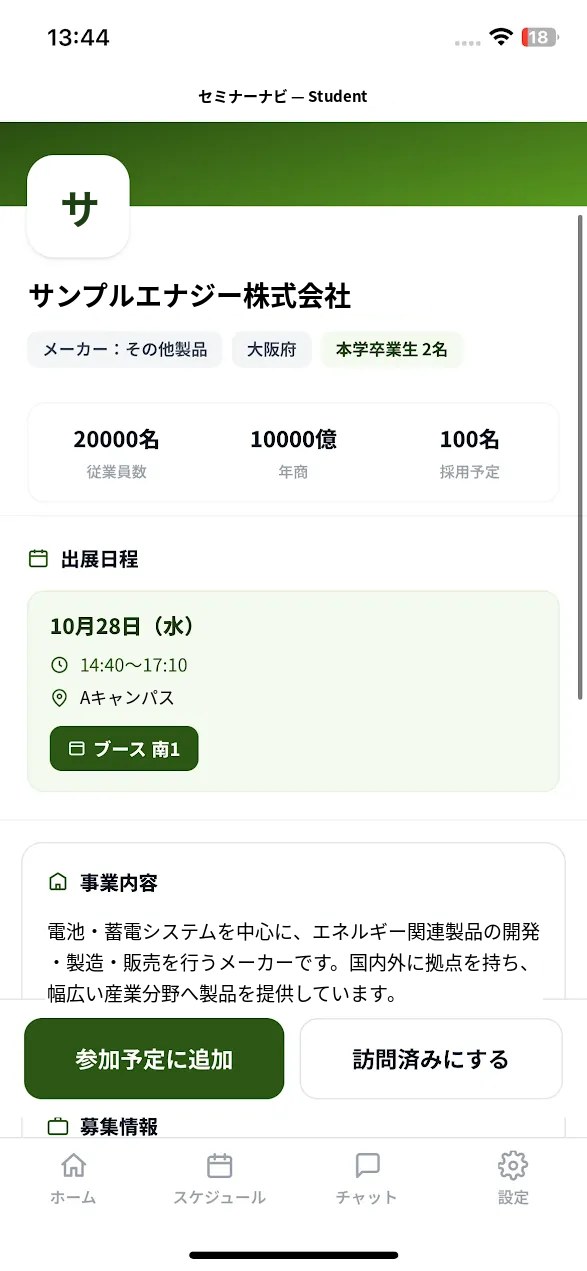
Every autumn, a public university holds an in-house career seminar. More than 100 companies exhibit, but information about them was distributed only as paper brochures and PDFs. Students had no way to narrow down the companies they should meet before the event, so many learned about a company only once they were in the hall. VAON developed Seminar Navi together with the university, as its first adopting school: a seminar support service that students open in one tap from LINE, which they already use every day. It went into production in October 2026, about five weeks after requirements were defined. Students search and compare companies and plan their visits in advance, and the university can review views and visits as data.
Challenges
Information on 100+ companies existed only on paper and PDF, so students could not narrow it down beforehand
There was no way to filter by industry, work location, or whether a student's faculty is a recruiting target. Finding a company to meet meant reading the documents one by one, and many students ended up walking the hall by instinct.
Without a company they wanted to meet, students had little reason to come
The seminar runs on weekdays over several days, so students give up class and travel time to attend. Unless they know in advance that a given company will be there on a given day, the reason to attend is unclear.
No record of who viewed or visited which company
Student views and visits were not recorded. Without numbers, the university could not review the seminar's results, and had no data to use for individual career guidance, feedback to exhibitors, or recruiting companies for next year.
Handling student personal data required a design the university could explain
Desired industries and visited companies are personal information for students. Collecting more data for convenience would be hard for a university to justify. Keeping only what is needed, limiting who can view it, and logging operations were conditions of adoption.
VAON's Solution
How we worked: in the first meeting we clarified the seminar format, the target faculties, and the metrics the university wanted to measure. Meetings and follow-up questions were handled directly in Japanese, and what was decided and what was still open was shared in writing each time. We started with a few faculties and will decide with the university whether to expand once the results are confirmed.
For students: start in one tap, find the right companies
No install, one tap from LINE. The service opens from the menu of the university's official LINE account using LINE's official SDK (LIFF). There is no download and no ID or password, so students are not lost at the "please install it" step.
Recommendations by explainable rules. Companies are scored on how well they match a student's faculty, desired industry and desired role. No generative AI is used, so the same conditions always give the same result and the reason can be shown, such as "matches your desired industry". The university adjusts the weights in the admin screen and previews the change before applying it.
AI chat that answers only from data the university registered. Ask "Which IT companies can I meet on this day?" and it returns matching companies as cards. For questions outside the registered data it does not guess, and points to the university's contact desk.
For the university: light operation, data handled with care
Usable when the venue signal is weak. It is a web app (PWA) that stores company information on the device, and actions taken offline are synchronised once the connection returns.
Company registration by bulk import from Excel, which the department already uses. The differences can be reviewed before importing, and the import can be undone within a set time. Companies that students have saved as favourites are unpublished rather than deleted, so student-side data is not broken.
No names are collected. Students use a nickname. Administrator operations are logged, including viewing an individual's detail screen. The server can be built in a region within Japan.
Key Features
Launch from the university's official LINE menu with no install or sign-up; setup takes 4 steps, about one minute.
Filter by seminar day, industry, work location and whether your faculty is targeted; alumni counts appear on each company card.
Search that treats hiragana and katakana spellings as the same.
Rule-based recommendations that show the reason, with scoring weights the university can adjust and preview.
AI chat limited to data the university registered; out-of-scope questions are routed to the university's contact desk.
Admin dashboard with daily users and most-viewed companies, plus per-company PDF reports on views and visits.
Value Delivered
About five weeks from requirements to production. After requirements, exhibitor data import, LINE integration and testing at the university, the service went live on a schedule worked back from the seminar date so that students had time to hear about it.
No install and no sign-up: usable in 4 steps, about one minute. Students tap the LINE menu and choose their affiliation, industries of interest and desired roles. "Not decided yet" is available for students without a direction.
Narrow down the companies to meet by day, industry and faculty. Show only the companies attending on a given day, filter by industry, location and whether your faculty is targeted, and see alumni counts on each company card.
Views, favourites and visits are recorded, and per-company PDF reports can be exported. The admin screen shows daily users and the most-viewed companies, and the reports can be used for feedback to exhibitors and recruiting next year.
Current limitations
-
1
Impact on attendance and visits has not been measured yet. The seminar is still under way; attendance and visits per student will be added after it ends and the university confirms them.
-
2
Visits are recorded from the student's own action. Automatic recording by scanning a QR code at the booth is not implemented and is being considered as a future extension.
-
3
Currently an early rollout in some faculties. Expansion to the whole university will be decided based on these results.
-
4
Exhibitors cannot update their own information. The university reviews change requests from companies and updates the data.
Related Case Studies
Facing a similar problem?
Book a 30-minute consultation with the VAON engineering team, or explore the services behind this case study.