Caveman: When AI Agents “Talk Less” to Save Tokens
AI Agents are becoming familiar tools for programming, research, and workflow automation. However, when using an agent during long sessions, a common problem appears: AI does not only write code or execute tasks, but also generates a large amount of explanations, comments, and intermediate descriptions.
Some of this content can be useful, but it can also make the context grow larger, slow down responses, and increase token usage.
This is the problem Caveman aims to address: helping AI Agents respond more concisely while preserving important technical information.
Where Are Tokens Being Spent?
When working with an AI Agent, tokens are not only used for the user's question. A single session may include:
- Prompt content
- Conversation history
- File and log content
- Tool schemas
- Results from terminal commands
- Agent explanations
- Code, diffs, and error messages
- Context sent back across multiple iterations
Among these, natural-language explanations often contain many words that do not directly affect the final result.
Example
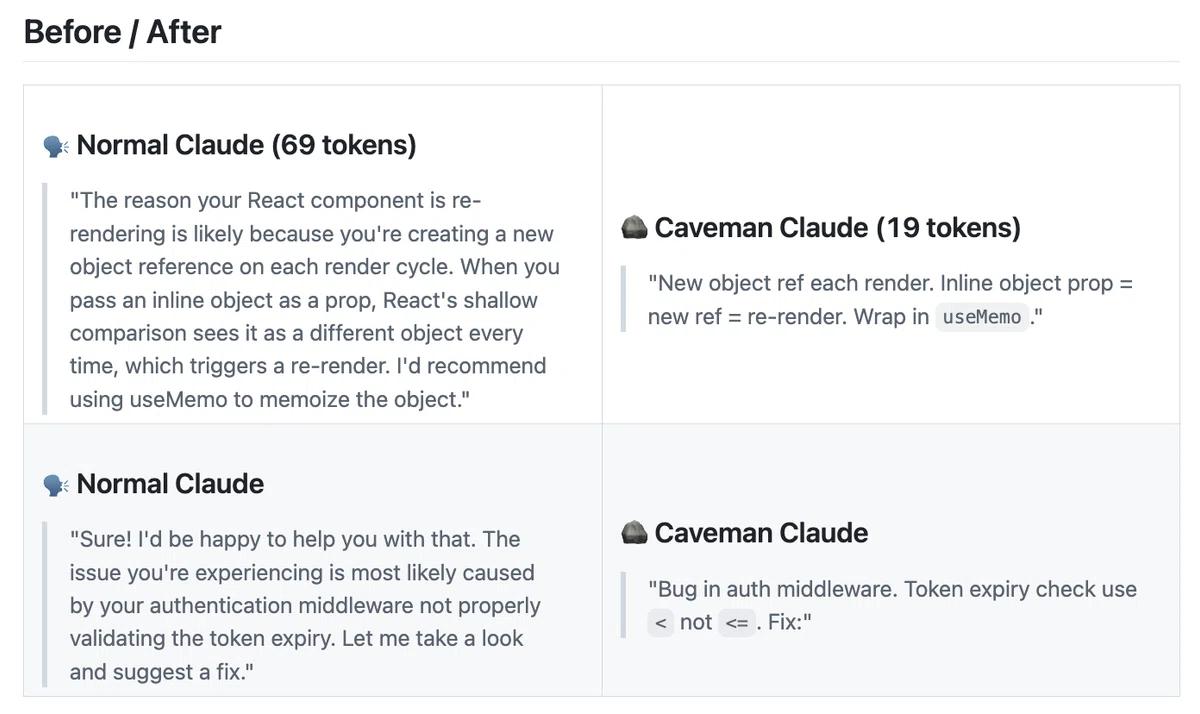
Instead of writing:
“The reason your React component is re-rendering is likely because you are creating a new object reference on each render cycle…”
The agent could respond more concisely:
“New object ref each render. Inline object prop = new ref = re-render. Use useMemo.”
Both responses communicate the same technical idea, but the second one is significantly shorter.
This is how Caveman works: reduce unnecessary explanations while preserving the code, commands, and technical errors that matter.
The Problem: AI Responses Are Too Long During Long Sessions
A longer answer is not always a better answer.
For many technical tasks, users only need:
- The cause
- The solution
- The file that needs to be changed
- The command to run
- The verification result
But AI often adds:
- Long introductions
- Repeated explanations
- Unnecessary comments
- Restatements of the requirements
- Transitional sentences between steps
- Conclusions that repeat what has already been said
If a session contains only one question, this extra content may not matter much. But when an agent works through multiple iterations, the output can accumulate and cause the context to grow.
As the context grows, the agent may need to process more content in subsequent turns. This affects:
- Response speed
- Context limits
- Ability to track state
- Model usage costs
What Is Caveman?
Caveman is an AI skill/plugin that helps agents use a more concise response style.
Its core principle can be summarized as:
Keep what is necessary. Remove explanations that do not add value.
Caveman focuses on natural-language output. Code, commands, and error messages are preserved to avoid losing important information.
The skill supports several popular coding agents, including:
- Claude Code
- Codex
- Gemini CLI
- Cursor
- Windsurf
- Cline
- Copilot
Some Caveman modes allow users to adjust the level of conciseness, from light to aggressive. Users can enable the skill when they want shorter responses or disable it when detailed analysis is needed.
Before and After
Example 1: Explaining a React Error
Before using Caveman:
The reason your React component is re-rendering is likely because you are creating a new object reference on each render cycle. When you pass an inline object as a prop, React’s shallow comparison sees it as a different object every time, which triggers a re-render. I recommend using useMemo to memoize the object and preserve the same reference between renders.
After using Caveman:
Inline object creates new reference each render → React re-renders. Use useMemo.
Result: The same cause and solution, with less explanation.
Example 2: Summarizing Code Changes
Before using Caveman:
I have reviewed the changes and found that the authentication middleware now correctly validates token expiration. The implementation checks the expiration timestamp before allowing the request to proceed. This should prevent expired tokens from being accepted by the API. No additional changes appear to be necessary.
After using Caveman:
Auth middleware now checks token expiry. Expired tokens rejected. No further changes needed.
Benchmark from the Caveman Project
According to the benchmark published in the Caveman repository, the skill reduces output tokens by an average of approximately 65% across 10 technical prompts, with reductions ranging from 22% to 87%, depending on the task.
The benchmark records an average output reduction from 1,214 tokens to 294 tokens.
| Task | Normal | Caveman | Reduction |
|---|---|---|---|
| Explain React re-render bug | 1,180 | 159 | 87% |
| Fix auth middleware token expiry | 704 | 121 | 83% |
| PostgreSQL connection pool | 2,347 | 380 | 84% |
| Explain Git rebase vs merge | 702 | 292 | 58% |
| Refactor callback to async/await | 387 | 301 | 22% |
| Review PR for security issues | 678 | 398 | 41% |
| Implement React error boundary | 3,454 | 456 | 87% |
| Average | 1,214 | 294 | 65% |
These numbers show that Caveman can significantly reduce explanatory output.
However, it is important to interpret the figure correctly: this is a result from the project's own output-token benchmark. It does not mean that the total cost of every session will also decrease by 65%.
Independent Testing Results
JetBrains conducted an A/B benchmark on 86 real-world coding tasks from SkillsBench, using the same model, task, setup, and budget. In this experiment, Caveman was forcibly enabled.
The JetBrains results showed:
- Output tokens decreased by approximately 8.5% on real agentic tasks.
- No significant quality degradation was detected.
- 82 tasks were used for paired comparison.
- 64 tasks produced equivalent results.
- 8 tasks performed better with the skill enabled.
- 10 tasks performed worse with the skill enabled.
- Expected cost reduction was around 10%, although this could be affected by outlier tasks.
This explains why chat-style benchmark numbers can be significantly higher than the savings achieved in a complete coding-agent session.
In coding workflows, tokens are not only used for what the agent “says.” They are also consumed by:
- Code
- Diffs
- Tool calls
- Logs
- Context
Understanding the 65% Figure Correctly
Caveman can reduce output tokens by approximately 65% in the project's benchmark, but this number should not be interpreted as:
“Every session will save 65% in cost.”
There are several reasons:
- The skill primarily shortens natural-language output.
- Code and commands are generally preserved.
- Tool calls and logs can account for a large portion of tokens in a coding session.
- Input tokens and reasoning tokens do not necessarily decrease.
- The skill may add some instructions to the input.
- Tasks that already produce short answers may not see much savings.
- Some sessions may achieve little savings or even no overall token benefit.
JetBrains concluded that the actual savings on agentic coding tasks are significantly lower than the figures promoted by chat-style benchmarks.
Their approximately 8.5% reduction should therefore be viewed as a more cautious independent reference.
Another analysis also points out that output tokens account for only a portion of the total cost of many Claude Code sessions. Therefore, a large reduction in output does not automatically translate into a proportional reduction in the bill.
When Is Caveman a Good Fit?
Caveman is a good fit when:
- Your agent regularly responds with more detail than you need.
- You perform many small tasks consecutively.
- You are already familiar with the workflow and do not need lengthy explanations.
- You want to reduce narration between tool calls.
- You need short, clear, actionable responses.
- You frequently encounter context or quota limitations.
For example, when asking an agent to inspect a file, you may only need:
Findings: - Missing auth check in update endpoint. - Duplicate request possible. - Add idempotency key.
Instead of a long explanation describing how the agent read the file, analyzed the logic, and arrived at the conclusion.
When Should You Not Use It?
You should avoid using highly aggressive concise modes when:
- You are learning a new technology.
- You need to explain an architecture to someone else.
- You are debugging a complex issue.
- You need to maintain a complete decision log.
- You are conducting a security or compliance review.
- You want the agent to present all assumptions and risks.
- The task requires detailed explanations for auditing.
In these situations, shorter responses may remove important context.
Saving tokens should not come at the expense of understanding or verifying the result.
How to Use Caveman Safely
Caveman should be viewed as a tool for adjusting output style, not as a complete replacement for context optimization.
To evaluate its real-world effectiveness, you should:
- Run the same task with and without Caveman.
- Measure input tokens, output tokens, and total tokens.
- Compare response times.
- Check the quality of the final code or result.
- Track how often you need to ask follow-up questions.
- Evaluate short and long tasks separately.
- Measure across multiple sessions rather than relying on a single example.
Token Saving Formula
Token saving = (Tokens without Caveman - Tokens with Caveman) ÷ Tokens without Caveman × 100
Most importantly, do not measure token usage alone. You should also measure:
- Task completion time
- Number of revisions
- Number of errors
- Readability
- Output quality
What Part of the Token Problem Does Caveman Solve?
Caveman primarily addresses the tokens used by the agent's output.
However, comprehensive token optimization involves many other layers:
- Remove unnecessary context.
- Reduce redundant logs.
- Load only relevant files.
- Avoid sending excessively long conversation history.
- Optimize tool schemas.
- Break large tasks into smaller steps.
- Store memory selectively.
- Use retrieval instead of stuffing all data into context.
- Prevent the agent from repeatedly reading irrelevant documents.
The Caveman repository also explores areas such as:
- Input compression
- Log processing
- JSON
- Diffs
- Search results
- Content-specific context handling
A benchmark published in the repository reports that the Caveman proxy reduced provider-reported input tokens by 33.2% in a specific Claude Code configuration. However, this result depends on the corresponding configuration and benchmark.
Conclusion
AI Agents do not only consume tokens when reasoning. They also consume tokens when explaining, repeating information, reading context, processing logs, and passing data through multiple iterations.
Caveman addresses one specific part of this problem: helping agents talk less while preserving code, commands, and important technical information.
The project's benchmark reports an average 65% reduction in output tokens across technical prompts, while an independent JetBrains experiment found an approximately 8.5% reduction on agentic coding tasks.
The most reasonable way to look at it is:
Caveman can make AI Agents more concise, easier to read, and sometimes more token-efficient — but its impact should be measured on your actual workflow rather than judged by a single benchmark number.
Use it when you want to reduce unnecessary explanations. But for tasks that require deep analysis, auditing, or comprehensive explanations, prioritize quality and traceability over token savings.